


.png)
.png)
Microsoft recently released an updated version of its Zero Trust Assessment (v2), and it’s one of the more practical tools they’ve produced in this space.
Before getting into why, it helps to define the problem it addresses.
Security drift is the gradual misalignment between how a tenant is configured today and what current best practice would recommend. It’s not usually the result of poor decisions. It’s what happens when environments evolve over time.
A conditional access policy created during a pilot project still excludes a test group two years later. A temporary exception for a vendor account never gets revisited. MFA is enabled, but privileged accounts are still using older authentication methods because “we’ll come back to that.” The person who originally designed the environment has moved on, and no one has reviewed the whole thing against updated guidance in years.
That’s drift — not failure, but accumulated history.
Why This Version Is Worth Attention
Microsoft has offered assessment tools before, but this iteration feels more mature and more comprehensive.
The Zero Trust Assessment (v2) evaluates a Microsoft 365 tenant using Microsoft Graph and maps findings across identity, device management, privileged access, and policy enforcement. It runs read-only and out-of-band. It does not modify configuration, intercept authentication, or impact users. It simply gathers configuration data and produces a structured report.
What’s improved in this version is scope and context.
The reporting aligns more explicitly with Zero Trust pillars and recognized frameworks such as NIST and CIS. Findings are categorized by risk level and status. Each recommendation links directly to Microsoft Learn documentation. In many cases, the report includes notes about user impact and licensing requirements — something earlier tools didn’t surface as clearly.
That operational awareness matters. It reflects a more realistic understanding of how organizations actually make security decisions.
What I Find Valuable About It
What stands out to me is that the assessment evaluates the tenant against updated recommendations rather than original intent.
Even when an environment was thoughtfully built, it was built at a moment in time. Microsoft’s guidance evolves. Threat actors evolve. Features are added. Over time, the configuration that once represented best practice may no longer align with today’s expectations.
The assessment makes that visible.
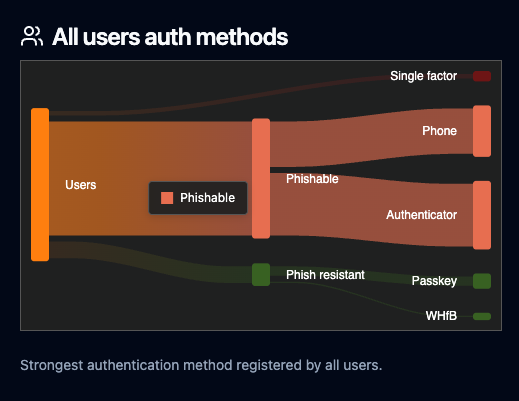
For example, I’ve seen tenants where MFA is broadly enabled, but phishing-resistant methods like FIDO2 or certificate-based authentication haven’t been adopted for privileged users. Technically, MFA is “on.” From a modern Zero Trust perspective, the posture is incomplete.
That’s the kind of nuance the report helps surface — not whether something exists, but whether it aligns with current risk models.
Posture Assessment Is Diagnostic. Hardening Is Strategic and Operational.
This distinction is important enough to state clearly.
The Zero Trust Assessment identifies where configuration may not align with current guidance. It does not decide which changes make sense for your organization or how quickly they should be implemented.
Consider phishing-resistant MFA. From a security standpoint, it’s clearly stronger than SMS or push-based authentication. But rolling it out across an organization requires hardware tokens or compatible devices, user training, help desk preparation, and possibly licensing adjustments. In some environments, that’s straightforward. In others, it requires phased rollout and executive sponsorship.
The assessment may flag the gap. The strategy around closing it is a separate conversation.
The same applies to conditional access tightening, device compliance enforcement, or privileged access restrictions. Stronger controls are not always implemented overnight. They are sequenced.
Assessment is diagnostic. Hardening is strategic and operational.
Drift Doesn’t Announce Itself
Microsoft 365 environments are rarely static. Mergers introduce new users and policies. New workloads are adopted. Legacy authentication methods linger longer than expected. Device management strategies evolve.
Without a structured review against current guidance, it’s difficult to know whether your security posture reflects intentional design or accumulated history.
The updated Zero Trust Assessment provides a way to answer that question without disrupting operations. It reflects a more comprehensive and operationally aware approach than earlier iterations, and that makes it useful.
It’s not a cure-all, and it’s not something I would position as a solution by itself. It’s a well-designed diagnostic instrument that helps organizations see clearly before they decide how to act.
If you want to understand how your tenant aligns with current Zero Trust guidance — and what those findings would realistically mean for your organization — that’s where thoughtful interpretation comes in.
We’re happy to have that conversation. You can contact our team here to get started.
Looking for Expert Advice?
We're happy to help!